
I cannot update the apps in V-Appstore. What should I do?
Please don`t worry, here are some helpful methods for you:
1. Reboot your phone, then try again;
2. Clear the data of Download manager & V-Appstore;
3. Connect to more stable and faster network, then try again;
4. Update your phone and V-Appstore to the latest version;
5. Access Settings>More settings>Backup & Reset>Restore(Reset) all settings. Don`t worry, no data or media will be deleted.
If above measures are not effective, please feel free to contact us.
Why is there no the Speaker option in FM Radio on my phone?
We are sorry there is no the Speaker option in FM Radio our some phones. You can download & install third-party FM Radio apps to achieve this feature. If this feature is really important for you, please give us a feedback. Thanks for your support.
Can I use FM Radio without the earphone (headphone/headset)?
Vivo phones don’t include an antenna for the FM radio inside and instead rely upon the wires inside your earphone cable to pick up the reception, so it is necessary to put on the earphone if you want to listen to FM Radio.
Why is there no FM Radio on my phone?
Some Vivo phones don’t have FM Radio due to the hardware limitation. But don`t be upset, you can download the third-party apps to achieve it.
How many pictures can one note contain at most?
One note can contain ten pictures at most.
Does Vivo phone have the built-in scanner which is used to scan QR bar code?
Currently, our some phones support this feature. You can find it on the Notification Panel and Smart Launcher Screen. For other phones, we recommend you download & install the third-party apps such as Lighting QRcode Scanner in Play Store to achieve it.
Where can I find my notes folder in File Manager?
Considering the privacy security of Vivo users, the notes are stored in system space and cannot be found in File Manager. Hope for your understanding.
How to block ads in Vivo Browser?
Go to Vivo Browser>touch at the bottom>click the Settings icon
 , then you can turn on Block pop-ups and Ad reject to block the malicious ads.
How to use Kids mode?
1. Enter Kids Mode;
2. Click the Settings icon in the left bottom>enter the lock screen password to access the Setting interface;
3. Click Manage apps to set up the apps and games to play. Touch Time limit for each use to set “time to use”. Tap Data network to manage the network;
4. In the Kid Mode interface, you can touch Exit in the right bottom, then enter the lock screen password to exit Kids Mode.
How to change the background color of my notes?
Enter the edit interface of the note, then you can touch icon at the bottom to set the background color for your notes.
How to recover the original version of i Manager?
You can go to Settings>More Settings>App manager>touch More at the upper right corner>Show system processes>i Manager(For Funtouch OS 4.0 and lower version, access Settings>More settings>Applications>All>i Manager), then touch Uninstall updates to recover the original version.
If Uninstall updates option is gray, you can go to Settings>More settings>Backup & Reset>Erase all data>Reset phone to recover its version.
Warmly Tips: “Erase all data” will clear the
What is Kids mode?
The Kids Mode is designed for children’s entertainment. In Kids mode, you don’t have to worry the software and important files will be deleted, and you don’t have to worry they perform payment-related operations. You can set up apps and games to play, time to use, and disable the network.
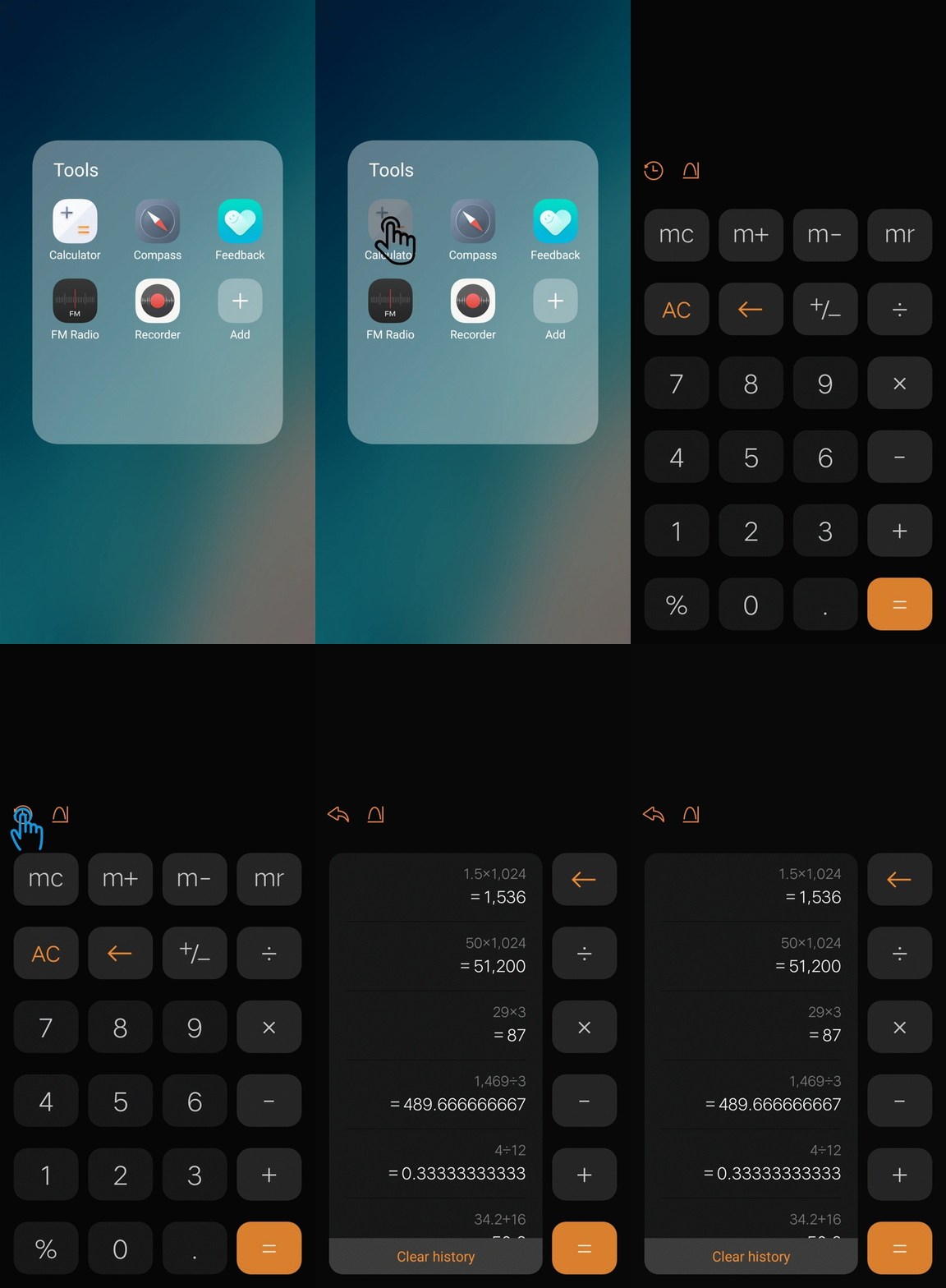
How to check the calculation history in Calculator?
Open Calculator, click icon, then you can find the calculation history in Calculator.
Warmly Tips: Some phones do not have the calculation history.
Why are there no pictures in Browser?
Please don’t worry, you can refer to the methods below to fix it:
1. Enter Browser, click at the bottom to check if the Text mode is turned on. If yes, turn it off for a try;
2. Change another stable network, then try again;
3. Updateyour phone and Browser to the latest version;
4. Clear the data of Browser.
If the issue still exists, please feel free to contact us.
Does Vivo phone have the built-in Weather app?
Our latest released phones all have the built-in Weather app.
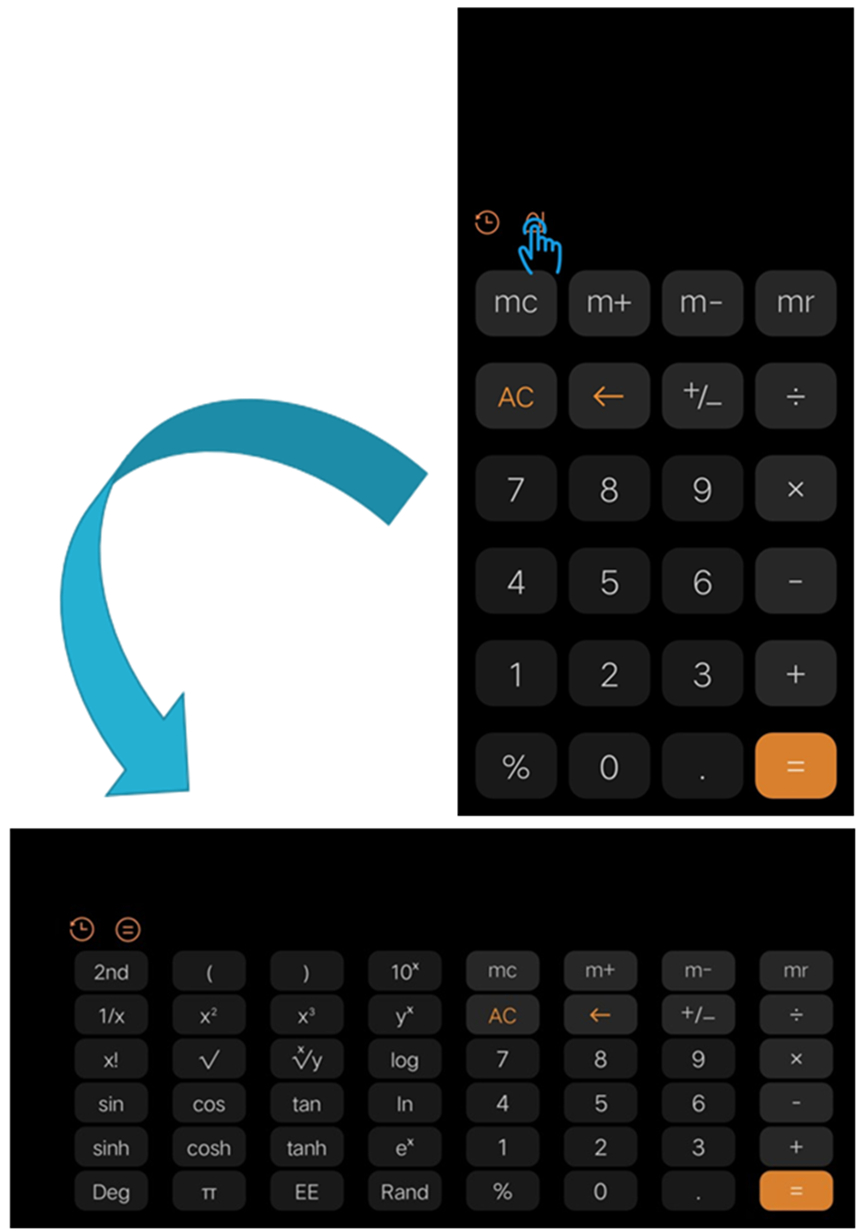
How to enter Scientific Calculator?
For Funtouch OS 4.0 and higher version, enter Calculator, then touch icon to enter Scientific Calculator.
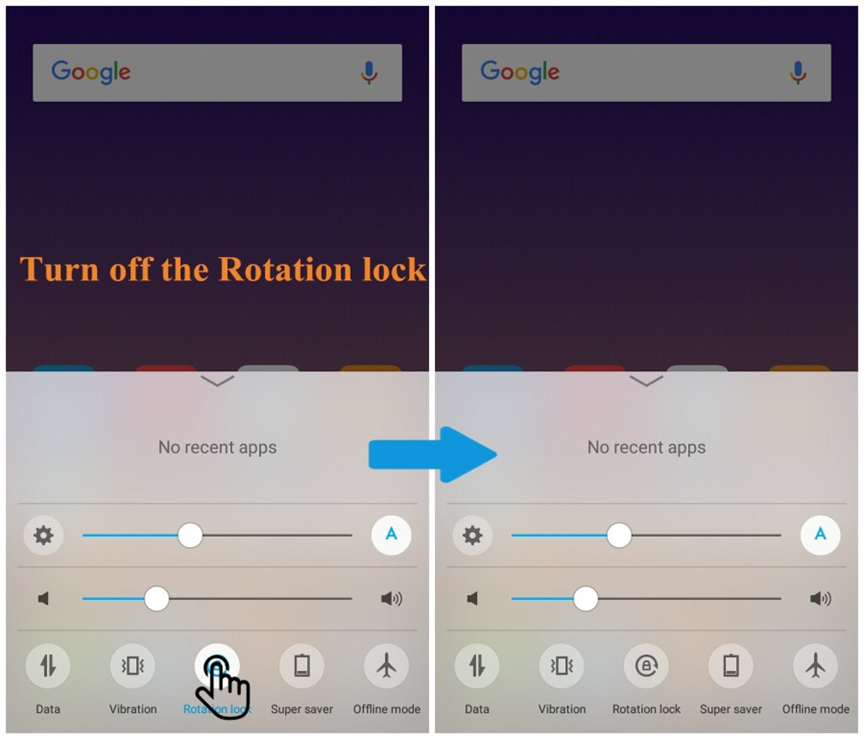
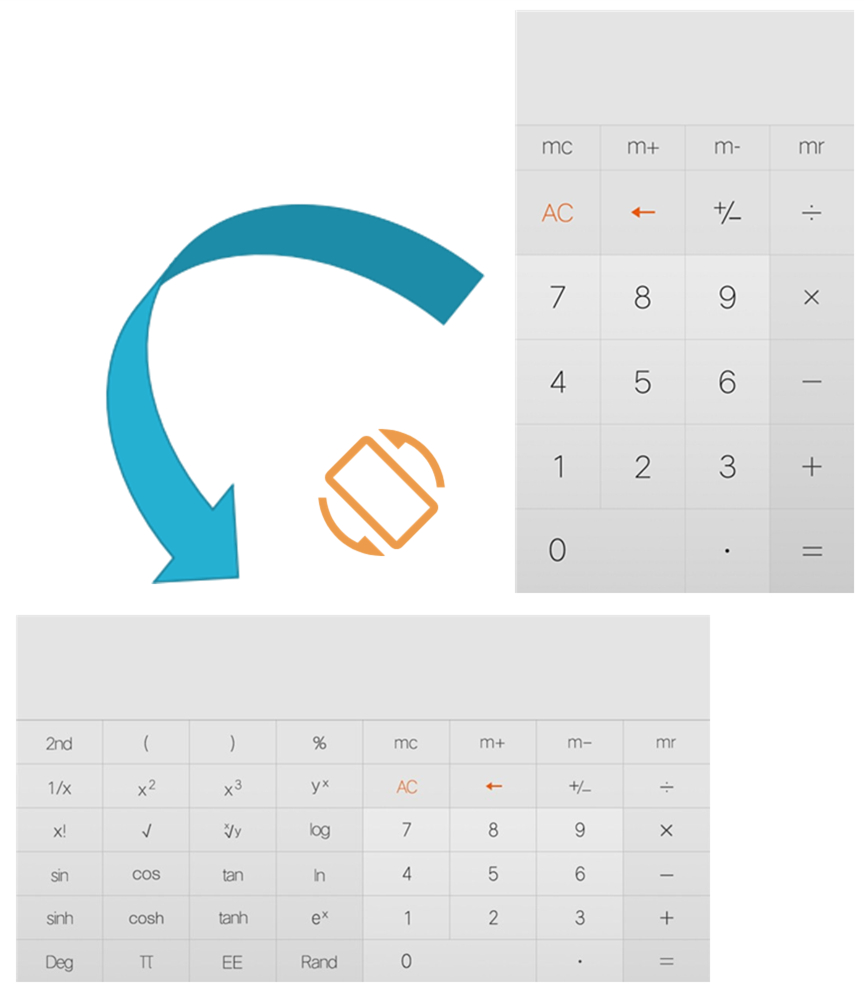
For Funtouch OS 3.2 and lower version, slide upward from the screen and turn off “Rotation”.
Then enter Calculator and rotate the screen in landscape mode to enter Scientific Calculator.
How to set Incognito in Vivo Browser?
Enter Vivo Browser, click at the bottom, then you will find Incognito option. Touch to turn it on.
How to set Degrees Fahrenheit?
Enter Weather>touch the Settings icon at the upper left corner>click Temperature unit, then you can set Degrees Fahrenheit.
How to set "Only text or No image" in Browser?
Enter Vivo Browser, click at the bottom, then you will find Text mode. Touch to turn it on.
Can I set Date Reminder for my notes?
Touch the note to enter the edit interface, then you can click the icon at the bottom to set Date Reminder.
How many words can one note contain at most?
One note can contain 9999 letters at most. If there are pictures, the letter amount will be lower than 9999.